The Uttar Pradesh Farmer Registry, known as UPFR, is the state’s official AgriStack portal at upfr.agristack.gov.in. Farmers in UP use it to register, link their land from the state’s khatauni records, and get a Farmer ID. With 2,47,59,182 Farmer IDs on 6 August 2026, it is the largest Farmer Registry in India, according to official figures.
This guide follows the official UP self-mode user manual, published on the UPFR portal, step by step. It also explains UP’s name-match rules, the Lekhpal’s role, how to check status, how to add land later, and where to get help.
Register only at upfr.agristack.gov.in or through the official app linked from it. AgriStack.net is an independent guide; we have no form and never ask for your Aadhaar or OTP.
Uttar Pradesh at a glance
| Item | Detail |
|---|---|
| Official portal | upfr.agristack.gov.in |
| Land record system | UP Bhulekh (upbhulekh.gov.in): khatauni, khasra/gata numbers |
| Who verifies claims | Lekhpal, for claims with medium name-match scores |
| Farmer IDs (6 Aug 2026) | 2,47,59,182, the highest of any state |
| Growth since 19 March 2026 | +47,83,531 (from 1,99,75,651) |
| Rabi 2025-26 crop survey | 5,56,88,914 plots, the highest of any state |
| Helpdesk | 0522-2317003 (official UP manual) |
Before you start: what UP farmers need
- Aadhaar number, and access to the mobile number linked to Aadhaar for OTPs.
- A mobile number for your UPFR account (can be the same number).
- Your khatauni details: district, tehsil, village and the khasra or gata number of each plot. You can view your khatauni on UP Bhulekh.
- About 20–30 minutes and a stable internet connection.
Compare the owner name on your khatauni with your Aadhaar name now. If they are very different (for example, a different first name, or the land is still in your father’s name), deal with that first. It decides whether your claim is approved automatically or goes to the Lekhpal. More in our documents checklist.
UP self-mode registration, step by step
The steps below follow the official UP manual. Screen labels may be in Hindi or English.
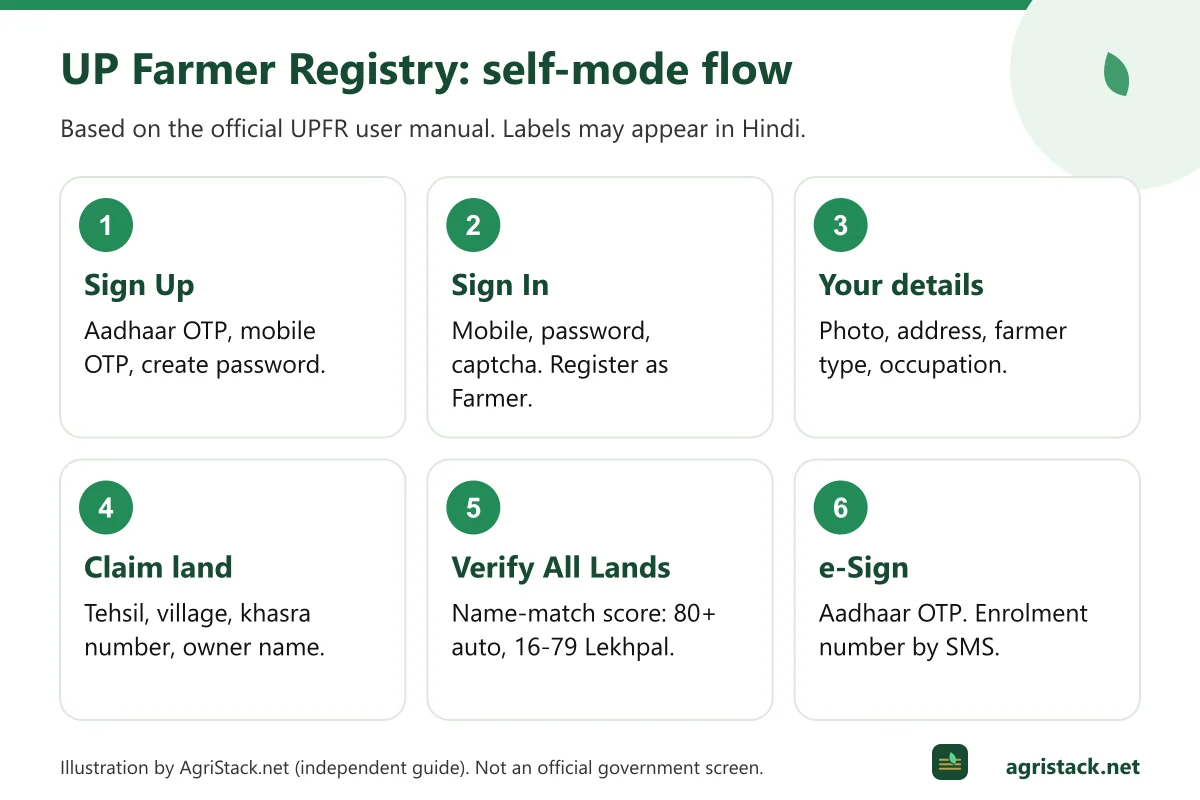
Part 1: Create your account (Sign Up)
- Open
upfr.agristack.gov.in, choose the farmer option and click Sign Up (साइन अप). - Enter the farmer's Aadhaar number and click Submit.
- Enter the OTP sent to the mobile number linked to Aadhaar and click Verify. Your details are fetched from Aadhaar. Click Next.
- Enter the farmer's mobile number, click Verify, then enter the OTP sent to it and verify again.
- When the mobile shows as verified, click Next.
- Create a password, enter it again and click Next. A popup confirms the farmer's account was created. Click OK.
Part 2: Sign in and open the registration form
- Enter your mobile number, password and the captcha, then click Sign In.
- Click Register as Farmer, then Next.
Part 3: Farmer details
The manual shows these screens in order, each followed by Next:
- Farmer details: fetched from Aadhaar.
- Farmer photo: from Aadhaar.
- Residential details: if they were not fetched properly, click Insert latest residential details. Select your village from the dropdown.
- Ownership details: select the farmer type from the dropdown.
- Occupation: tick both checkboxes and click Next.
Part 4: Claim your land
This is where your khatauni matters.
- On the land details screen, click Fetch Land Details.
- Select the tehsil (sub-district) and village of the land, enter the survey (khasra/gata) number and click Submit.
- Select the owner's name from the dropdown and click Show Land Details.
- Tick the checkbox for the plot and click Add.
- Repeat for every plot, then click Verify All Lands.
If your name is not in the list of owners, the manual shows a link, “My name is not there in the list of owners”, which searches the live RoR (Bhulekh). You can then pick the sub-survey number, which fills in automatically, and click Show Land Details. Use the arrow buttons to move through the list and Add the right plot.
After Verify All Lands, the system calculates a name-match score by comparing your Aadhaar name with the name in the land record. Click Next.
Part 5: Consent and e-Sign
- On the consent and declaration screen, tick the boxes and click Submit.
- On Farmer eSign, tick the boxes and click Proceed to eSign.
- Choose OTP-based authentication, enter the Aadhaar number and the OTP sent to the Aadhaar-linked mobile, tick the box and click Submit.
- A message confirms that the farmer's land details were added successfully.
You will receive an enrolment number by SMS. Save it; you need it to track your application. See enrolment number vs Farmer ID.
UP’s name-match rules and the Lekhpal
The official UP manual lists three “important points to remember”:
| Name-match score | What happens in Uttar Pradesh |
|---|---|
| 80 or above | Approved automatically by the system |
| 16 to 79 | Sent to the Lekhpal for approval |
| 15 or below | Blocked automatically; not allowed |
A score in the middle range is normal when names are spelt differently in Hindi and English, or a surname is missing from one record. It means the Lekhpal will check that you are the person named in the khatauni. A score of 15 or below usually means the land is recorded in someone else’s name, such as a deceased parent or a previous owner. In that case, apply for mutation (दाखिल-खारिज) at your tehsil first. See land mutation and the Farmer Registry.
The national FAQ also lists the most common rejection reasons: names that do not match sufficiently, land not in the farmer’s name, the owner having died without mutation, and records still in the seller’s name.
Checking your UPFR status
The UP manual says farmers can check their approval status at upfr.agristack.gov.in using Check Enrolment Status. Have your enrolment number or registered details ready. If the status says pending for a long time, read status pending: common reasons and contact your Lekhpal or tehsil.
After approval, the national FAQ says the Farmer ID is generated within about 24 hours.
Adding land later: the UFR process in UP
If you missed a plot during registration, Uttar Pradesh offers the Update Farmer Request (UFR). The manual says UFR lets farmers add remaining land parcels that were left out, and that it can be used only after the Farmer ID has been approved.
- Log in with your mobile number, password and captcha.
- Click Update My Information, then Land Ownership and Land Details.
- Click + Add New Land (Owned).
- Select the district, sub-district and village and enter the survey number. If needed, use "My name is not there in the list of owners" to search the live Bhulekh RoR.
- Select the sub-survey number, tick your name in the owners list and click Add Land Details. Repeat for other plots.
- Click Verify All Land, then Update Land Ownership and Land Details. An update request is raised.
The same rules apply: if every added plot scores above 80, the update is approved automatically; between 16 and 79, the Lekhpal must approve it. You can see your request by clicking the eye icon.
OTP not received in UP
The UP manual gives two reasons:
- UIDAI server issues can delay OTPs. Wait a few minutes and try again.
- The farmer’s mobile number is not linked to Aadhaar. The manual’s solution is to update the phone number in Aadhaar.
You can link or update your mobile at an Aadhaar enrolment or update centre. UIDAI’s helpline is 1947. More fixes in OTP not received.
Uttar Pradesh Farmer ID figures
Uttar Pradesh has the largest Farmer Registry in the country:
| Date | UP Farmer IDs | Source |
|---|---|---|
| 19 March 2026 | 1,99,75,651 | PIB, 24 March 2026 |
| 30 July 2026 | 2,46,28,676 | Lok Sabha reply, 4 August 2026 |
| 6 August 2026 | 2,47,59,182 | Lok Sabha reply, 11 August 2026 |
UP was also the only state for which the Ministry published district-wise figures (as on 30 July 2026). The top districts were Azamgarh (7,58,877), Sitapur (7,26,097), Jaunpur (7,05,897), Hardoi (6,86,929) and Kheri (6,26,190). Search all 75 districts on our district and village guide.
In the Rabi 2025-26 Digital Crop Survey, UP recorded 5,56,88,914 plots, more than any other state.
Where to get help in Uttar Pradesh
| Need | Where to go |
|---|---|
| Portal or process questions | UP Farmer Registry helpdesk 0522-2317003 (official manual); hours reported as Monday to Friday, 10 am to 6 pm |
| Claim waiting with Lekhpal | Your Lekhpal or tehsil office |
| Khatauni wrong or mutation pending | Tehsil (revenue) office |
| No smartphone or OTP problems | Common Service Centre or registration camp; see CSC guide |
| Aadhaar mobile or name update | Aadhaar enrolment centre; UIDAI 1947 |
The UP Farmer Registry app
Uttar Pradesh also offers a mobile app for the Farmer Registry. Our UP Farmer Registry app guide explains how to find the genuine app through the official portal and avoid look-alikes.