A Farmer ID is a unique digital identity number given to a farmer when they are registered in their state’s AgriStack Farmer Registry. It links the farmer, verified through Aadhaar, to the land they hold in the state’s land records. Government schemes can then use the Farmer ID to confirm who you are and what land you farm, instead of asking for land papers every time.
The national AgriStack website calls it “a functional ID, based on Aadhaar” with “a digitally verifiable credential”. The Ministry of Agriculture describes it more simply as a “digital identity” for farmers. By 6 August 2026, more than 10.33 crore Farmer IDs had been generated across 21 states and union territories, according to a reply in the Lok Sabha.
This guide explains what the Farmer ID is and is not, the different numbers you may see during registration, how the ID is created, what it is used for, and what to do if something is wrong.
You register on your state’s Farmer Registry portal or at a help centre. Your identity is checked with Aadhaar, you claim your land, and you give consent with e-Sign. You get an enrolment number by SMS. When officials approve your claim, the system generates your Farmer ID, typically within about 24 hours of approval. The ID does not expire, and you keep one Farmer ID even if you hold land in more than one state.
What a Farmer ID actually represents
Think of the Farmer ID as a key that opens a verified file about you as a farmer. The file is held by your State Government and contains:
- your basic identity details, verified through Aadhaar e-KYC (name, gender, date of birth, address and photo, depending on the state);
- the land parcels linked to you from the state’s land records, each with its own Farm ID;
- in many states, information such as the crops recorded on your land in the Digital Crop Survey, and assets such as livestock or fisheries where the state collects them.
The national website says the registry should contain “minimal demographic details” needed to identify the farmer and determine eligibility for schemes. It is not meant to hold everything about you.
What the Farmer ID is not
| A Farmer ID is not… | Why this matters |
|---|---|
| Proof of land ownership | The national website says the link to land records is “for non-legal, planning and advisory, and scheme-delivery purposes only”. Ownership is still proved by the land records themselves. |
| A replacement for Aadhaar | It is built on Aadhaar verification, but it is a separate number. The official FAQ says the registry application stores a random Farmer ID and keeps Aadhaar in a separate data vault. |
| A scheme or a payment | Having a Farmer ID does not by itself mean you will receive any benefit. Each scheme has its own eligibility rules. |
| A national registration | Farmer IDs are issued through state registries. You cannot get one from a central form. |
The different numbers you may see
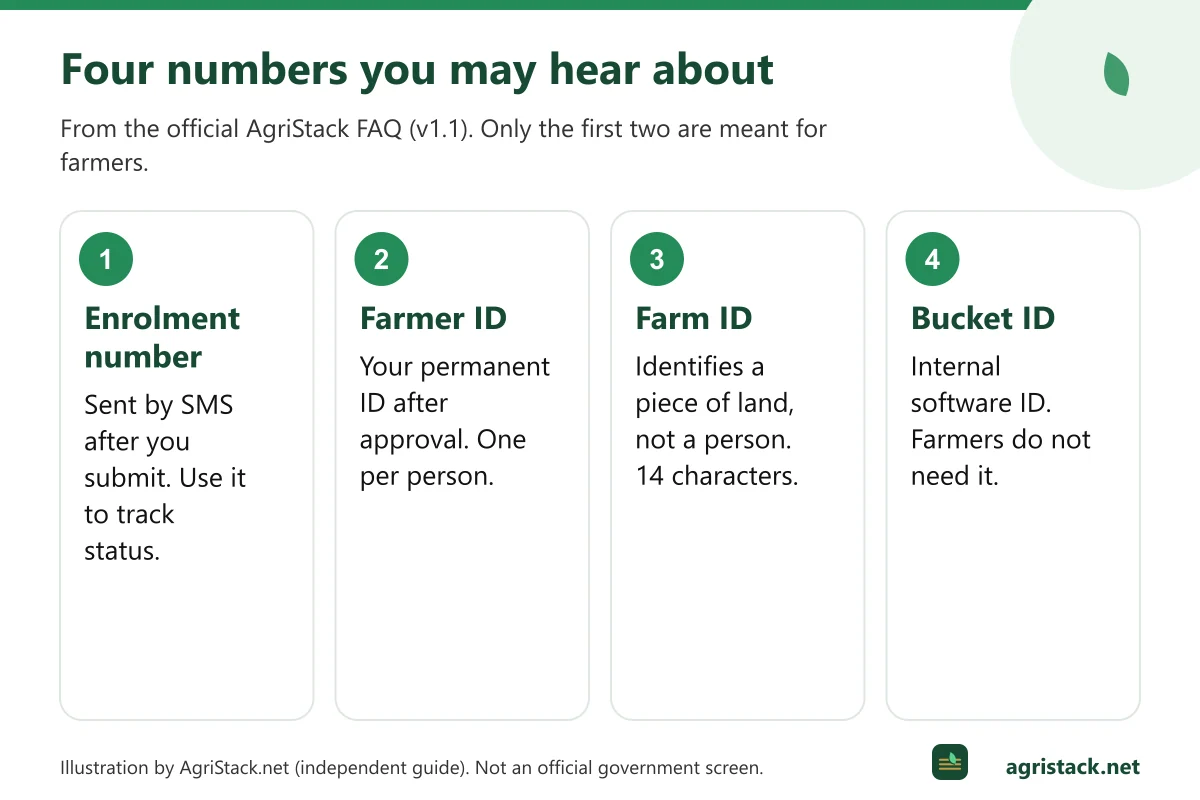
People often get confused because registration involves several numbers. The official AgriStack FAQ explains each of them. Here they are side by side:
Enrolment number (draft Farmer ID)
When you complete your land claim and give consent, an enrolment number is sent by SMS to the mobile number you gave. The FAQ calls this the “draft Farmer ID” or “Enrolment ID”. You use it to track your application. It stays relevant only until your Farmer ID is created.
The FAQ describes its structure as state code, district code, village code and a running serial number. So it looks different from the final Farmer ID, and it changes nothing about your land.
Farmer ID
This is the final, permanent number. The FAQ says it is “created against an Aadhaar” once the claim is approved, and describes the final Farmer ID as “a 10 digit random number followed by a 1 digit checksum”. The checksum digit helps systems catch typing mistakes. Because the number is random, it does not reveal your district, village or any personal information.
Some state portals may display the Farmer ID with extra formatting, and states may use local-language names for it. What matters is that it was issued by your state’s official Farmer Registry.
Farm ID (also called Farmland Plot ID)
This identifies a piece of land, not a person. The FAQ says a Farm ID is a 14-character string. The first two letters identify the state, followed by an 11-digit random number and a check digit. The FAQ’s example is OD234567890123 for Odisha. One farmer with five plots will have one Farmer ID and several Farm IDs. Our article Farm ID, Farmer ID and Land ID explains this in more detail.
Bucket ID or temporary Farmer ID
Before registration opens, the state’s land records are processed to group the plots owned by the same person in each village. Each group is a “bucket”. The FAQ is clear that “Temporary Farmer ID and Bucket ID are the same; both of these are internal ids used by software but not required by Farmer.” If someone asks you for your bucket ID, you do not need to know it.
How a Farmer ID is created
The process is the same in principle everywhere, though screens differ by state. The Uttar Pradesh user manual and the national FAQ describe these stages:
- Account and e-KYC. You sign up with your Aadhaar number and verify it with an OTP sent to the Aadhaar-linked mobile, or with biometrics at a help centre. You may also register a mobile number and create a password for later logins.
- Personal details. Your name, photo and address are fetched from Aadhaar. You add details such as farmer category and occupation.
- Land claim. The system shows land linked to you. If some land is missing, you search it by district, sub-district, village and survey number, choose your name from the owners list, and add it.
- Verification of land. The system compares your Aadhaar name with the owner name in the land record and calculates a name-match score.
- Consent and e-Sign. You accept the declarations and consent to join AgriStack, usually by Aadhaar OTP-based e-Sign.
- Enrolment number. You receive an enrolment number by SMS.
- Approval. If your name-match score is high, the state may approve the claim automatically; otherwise a revenue official reviews it.
- Farmer ID generated. After approval, the Farmer ID is generated, about 24 hours later according to the FAQ.
The full walkthrough, with tips for each step, is in our Farmer Registry online registration guide.
The name-match score
The name-match score decides much of what happens next. The official FAQ explains that the score shows how closely two names match, from 0 (no match) to 100 (perfect match), and that each state sets its own thresholds.
Uttar Pradesh’s official user manual gives a concrete example of how a state uses it:
| Name-match score (Uttar Pradesh) | What happens |
|---|---|
| 80 or more | Approved automatically by the system |
| 16 to 79 | Sent to the Lekhpal (village revenue official) for approval |
| 15 or less | Blocked automatically; not allowed |
Other states may use different numbers or extra approval levels. The lesson is the same everywhere: the closer your Aadhaar name is to the name in your land record, the smoother your registration. If they differ a lot, see our name mismatch guide.
Why a correct land record matters
The FAQ lists the most common reasons for rejected land claims:
- the names in Aadhaar and the land record do not match closely enough;
- the land is not in the farmer’s name in the land records;
- the owner has died and the land record has not been updated (mutation is pending);
- the land record is still in the seller’s name after a purchase.
All four are land-record or Aadhaar problems, not Farmer Registry problems. Fixing them happens at the revenue office or Aadhaar centre.
What the Farmer ID is used for
The official FAQ describes the long-term idea: the Farmer ID “would be used like Aadhaar for all farmer related services”. For example, when applying for crop insurance, a farmer would give their Farmer ID, authenticate, and have their land details filled in automatically, “without having to give any physical documents”.
In 2026, the Government told Parliament that Farmer IDs and AgriStack data were being used for:
- targeting beneficiaries for PM-KISAN Direct Benefit Transfer (how Farmer ID and PM-KISAN connect);
- enrolment under the Pradhan Mantri Fasal Bima Yojana (Farmer ID and crop insurance);
- MSP-based procurement through the Food Corporation of India and the Price Support Scheme of PM-ASHA (Farmer ID and MSP procurement);
- sanctioning Kisan Credit Card loans “within half an hour” where systems are integrated (Kisan Credit Card guide);
- fertiliser booking, disaster relief payments and linking with Soil Health Cards.
Whether a Farmer ID is required for a particular scheme, and from when, is decided by that scheme and often by your state. Do not rely on social media posts about deadlines. Check the scheme’s official website or ask your agriculture office. Our guide on verifying deadlines shows how.
Who can get a Farmer ID
The Ministry has said the State Farmer Registry “covers all the landholding farmers, including women farmers”, and that the application “has the provision to onboard all the landholding farmers, as well as cultivators such as tenants & sharecroppers”.
In practice, registration is built around land records. If your name appears as an owner or co-owner of agricultural land in your state’s record of rights, you can normally register. For tenants, sharecroppers and farmers whose land is still in a deceased parent’s name, the options depend on the state. See:
- Farmer ID eligibility
- Tenant farmers and the Farmer Registry
- Joint land and women farmers
- Inherited land
Joint owners and legal heirs
The FAQ explains that when land is jointly owned without separate shares, all joint owners are linked to the same Farm ID. After a farmer’s death, “the farmer ID would be inactivated” and the land’s Farm ID is linked to the successor once records are updated. If the land is divided among heirs, new Farm IDs are generated for each piece.
Checking, downloading and correcting your Farmer ID
Checking status
Most state portals have an option such as “Check Enrolment Status” or “Check Status” on the login page. You usually need your enrolment number or Aadhaar number. In Uttar Pradesh, the official manual points to the “Check Enrolment Status” option on upfr.agristack.gov.in. See our status check guide.
Downloading
Whether you can download a Farmer ID document, and in what format, depends on your state. The FAQ says a printed card “is the decision of the State govt.” See Farmer ID search and download.
Correcting or updating details
The FAQ describes a process called UFR (Update Farmer Request), which states can configure to let farmers update records. Uttar Pradesh’s manual says UFR can be used to add land parcels missed during first registration, but only after the Farmer ID has been approved. Changes to your name or land itself must usually be made first in Aadhaar or the land records, from which the registry reads. See Farmer ID correction.
Keeping your Farmer ID safe
- Your Farmer ID is not a password, but treat it like Aadhaar. Share it only with official schemes and services.
- Never share an OTP with anyone who calls or messages you, even if they say they are from the agriculture department.
- Register only on state portals whose address ends in
agristack.gov.in, or on apps linked from those portals. Read how to avoid fake AgriStack websites. - AgriStack.net never asks for your Aadhaar number, Farmer ID, password or OTP.
Next steps
- Find your state’s official portal in the state-wise directory.
- Prepare with the documents checklist.
- Register using the step-by-step registration guide.
- Need help? See Farmer Registry helpline numbers.